


Blood Donor
4.86.85K Reviews
App Specs
- Version
- 2.25.1
- Updated On
- License
- Free
- Downloads
- 1,000,000+
- Developer
- American Red Cross
- Categories
- Medical
- Platform
- Android, iOS
Screenshots
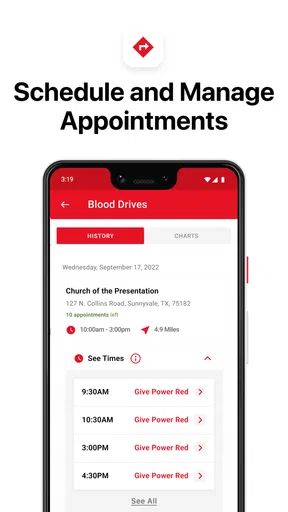
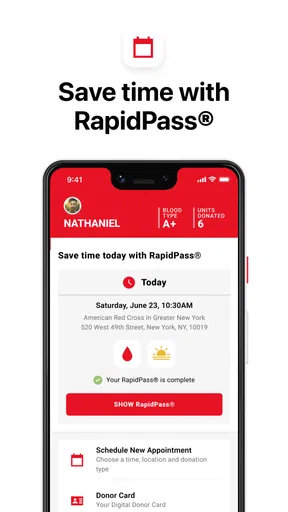
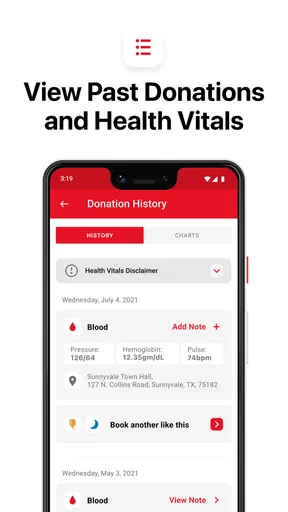
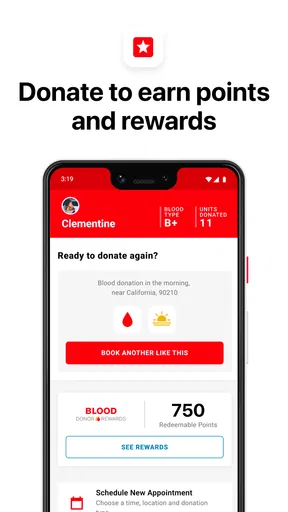
 Analysis by AppCompare
I approach blood donation as a practical commitment, not just a good intention: I need to know where to go, keep track of what I’ve done, and remember when I may be able to donate again. The American Red Cross’s Blood Donor app is built around that routine. It is a free medical app for people who want a clearer path from deciding to donate to following through, rather than a substitute for medical advice or the donation-center staff.
From good intention to a plan
The moment this kind of app is most useful is often an ordinary one: I have a free afternoon, realize I have not donated in a while, and want to turn that thought into a workable plan. Instead of searching the web for a location and then trying to remember my past donations separately, the app brings donation-related tools together. That focus is helpful, though it is most valuable to someone who expects to return to donating, not a person looking for a general health tracker.
Because eligibility and appointment details can depend on individual circumstances and current center arrangements, I would treat the app as a planning aid, not the final authority on whether I can donate on a particular day. I’d check the information it provides, then follow the center’s instructions and answer staff questions honestly. That distinction matters: a reminder can help me remember to consider donating, but it cannot decide whether donation is appropriate for me.
The app comes from the American Red Cross, an organization directly associated with blood donation in the United States. It has a 4.8 average from around 31,000 ratings, and more than a million installs. Those figures suggest that many people find it useful, but they don’t guarantee that every local search result or individual workflow will fit my needs. I’d judge it by whether it helps me complete the steps I actually need.
Turning a donation intention into an actual visit
When I first downloaded the Blood Donor app, I wasn't sure what to expect. But as soon as I opened it, I was greeted with a clean and intuitive interface. It's like the app knows exactly what you need without overwhelming you with too much information all at once.
Signing up is a breeze. You can either create a new account or link it with your existing social media profiles. Within minutes, you're all set to explore the world of blood donation. The app is well-designed, making it easy for anyone to navigate, even if you're not particularly tech-savvy.
Finding a center and checking the practical details
One of the most impressive features is the "Find a Donation Center" option. It uses your location to pinpoint nearby centers, providing you with addresses, contact information, and even directions. No more excuses about not knowing where to go!
Worth Reading Before You Choose

EA SPORTS FC Mobile 26 Is a Bigger Football Game, but It Takes Time

Flipboard Shows What News Apps Must Do Beyond the Feed

Switching to Android Auto Means Rethinking Your Driving Routine

Google Calendar Makes a Crowded Week Easier to Manage

Ludo King Makes the Most of the Minutes Between Plans

Baby Panda World Brings Quick Play to Modern Phones, but Its Game Library Feels Busy
For a realistic weekday scenario, I’d use this when a meeting ends early and I want to see whether donating can fit into the rest of my day. I’d look for a nearby center, check its address and contact details, and use the directions to plan the trip. I would still verify any appointment or availability details directly with the center before setting out; finding a location is a useful handoff, not a guarantee that I can walk in at a particular time.
A small but useful habit is to search while I still have time to adjust the plan, rather than waiting until I am already on the way. If the closest option is inconvenient, I can compare other locations shown by the app and decide whether the journey is realistic. This is where a location tool earns its place: it helps turn a vague intention into a route, while leaving the decision about timing and suitability to me and the center.
Keeping a record between visits
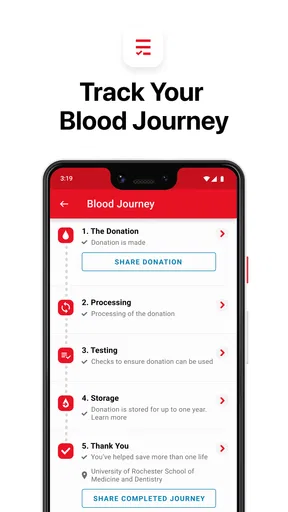
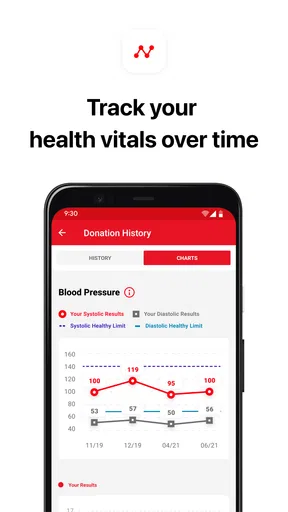
Another cool feature is the "Donation Tracker". This keeps a log of all your donations, including dates and locations. It's an excellent way to track your contributions and feel good about the impact you're making.
That record can also make the next visit easier to think through. Rather than relying on memory, I can use my history as a prompt when planning another donation or describing my past visits. I would not treat a personal log as a medical record or assume it replaces information held by donation staff. Its strength is simpler: it gives me a convenient view of my own donation activity within the app.
If I donate at a different place or have a question about whether a visit appears in my history, I’d check the app and then ask the relevant center or the app’s support channel about the record. Keeping a habit of reviewing the log after a visit is more reliable than trying to reconstruct dates much later. For someone who donates occasionally, that small step can prevent the tracker from becoming a half-remembered list.
Reminders, with a sensible boundary
The app also offers reminders for your next eligible donation date. It's like having a personal calendar that ensures you never miss an opportunity to donate. Plus, the notifications are gentle nudges rather than annoying alarms, which I really appreciate.
I’d use a reminder as a cue to revisit the plan, not as permission to donate. A notification can arrive when my schedule is busy, when I feel unwell, or when my circumstances have changed. In those cases, I can ignore it, check current guidance, and contact the center instead of treating the alert as a command. That is a practical trade-off: reminders reduce the chance that I forget, but they cannot account for every change in my life.
Compared with a standard calendar reminder, the app’s appeal is that donation history and donation-related prompts sit in the same place as center-finding tools. A regular calendar may be better if I want complete control over scheduling or need reminders for many kinds of appointments. For someone whose main goal is organizing blood donations, having the prompt tied to a donation-focused app is more convenient than building that workflow manually.
Information and the human handoff
Not to forget, the app keeps you informed with relevant articles and updates about blood donation. Whether it's new health guidelines or inspiring stories from other donors, the app ensures you're always in the loop.
That material can help me arrive with better questions, but I would keep the boundary clear between general reading and personal advice. If an article raises a concern about my own health or eligibility, the right next step is to ask qualified staff, not to infer an answer from a general update. The app works best as the first link in a chain: it helps me organize, the center handles the donation process, and staff address the details that depend on me.
This handoff is also why I wouldn’t use it as a replacement for calling a center when a plan is uncertain. The app can help me locate contact information and prepare, while a direct conversation is more appropriate for questions about a specific visit. That division of labor keeps the tool useful without expecting it to do a job that belongs to people who can assess the situation directly.
Who will get the most from it
I think this app suits people who already donate or are seriously considering making it a recurring habit. The combination of location search, a donation log, reminders, and educational material addresses several practical stages of that routine. It can also help a first-time donor move past the “where do I start?” question, provided they are comfortable following up with a center for details that require a direct answer.
It is less compelling for someone who only wants a general map, a broad medical reference, or a calendar for every part of life. A maps app can be enough if all I need is directions, and my phone’s calendar may be simpler if I only want a one-off reminder. Likewise, someone who does not plan to donate should not expect the app to provide much value simply because it is available.
The age rating is Everyone, and the app is free, so cost and audience restrictions are not major barriers for a typical user. It was released on September 5, 2014, and the current version is 2.24.1; it requires iOS or Android 10 or later. Before installing, I’d check that my device meets that requirement. If it does not, the app itself may not be an option, and contacting a donation center through another channel is the more practical route.
Where the flow can break
The biggest limitation is that a smooth in-app plan still depends on real-world details. A nearby location is not the same thing as a confirmed appointment, and a reminder cannot guarantee that I remain eligible or available. If I rely on the app without checking the center’s instructions, I could make an unnecessary trip or arrive with an unanswered question. I see that as a reason to use the app thoughtfully, not a reason to dismiss it.
There is also a personal preference to consider: account-based tools are most useful when I’m willing to keep my donation activity in one place. If I prefer not to create an account or connect any profile, I should review the sign-up choices before committing and decide whether the available setup suits me. I would never connect an account just for convenience without first being comfortable with that choice.
Its community feel may appeal to donors who enjoy hearing from others, but it is not the main reason I’d install it. People who prefer private, no-frills planning can focus on the location, tracking, and reminder tools and ignore social elements. I also wouldn’t use community stories to settle personal medical questions; another donor’s experience is not a substitute for guidance from donation staff.
A practical recommendation
What really makes the Blood Donor app stand out is its community feel. There's a section where you can connect with other donors and share your experiences. It's like being part of a secret club where everyone is dedicated to the same mission. Sharing stories and tips with other users makes the whole process even more rewarding.
In my view, the strongest reason to keep it installed is the connected routine: find a place, make a plan, keep a record, and get a nudge to consider returning. The community and reading material can add interest, but they are extras rather than requirements for the core task. If I wanted only an occasional address lookup, I’d stick with a map and contact the center myself. If I wanted to build a donation habit, the bundled tools make more sense.
My final take
In a nutshell, the Blood Donor app is a must-have for anyone interested in making a difference. It's user-friendly, informative, and makes the process of donating blood as simple as possible. The sense of community it fosters is just the cherry on top.
If you're ready to roll up your sleeves and start donating, this app is your perfect companion. Download it today and join the thousands of others who are changing lives, one donation at a time. It's not just an app; it's a movement. So, what are you waiting for? Let's save some lives together!
Pros
- User-friendly interface for easy navigation.
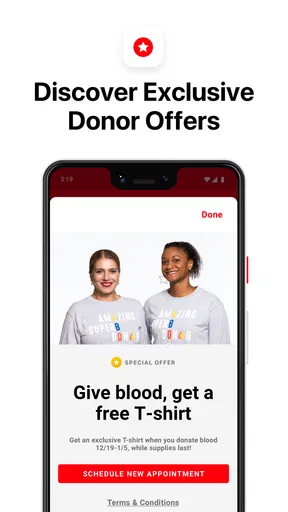
- Tracks donation history and appointments.
- Notifies users of local donation drives.
- Integrates with health data for insights.
- Supports multiple languages for accessibility.
Cons
- Limited availability in rural areas.
- Requires internet for full functionality.
- Occasional app crashes reported.
- Some features locked behind registration.
- No dark mode for nighttime use.
FAQs for Blood Donor
What is the Blood Donor app and how does it work?
The Blood Donor app is an innovative platform designed to streamline the blood donation process for both donors and recipients. It connects users with nearby blood donation centers and mobile drives. By creating a profile, users can receive notifications about upcoming donation opportunities, track their donation history, and find vital information about donation eligibility and requirements.
Is the Blood Donor app free to use?
Yes, the Blood Donor app is completely free to download and use. There are no hidden fees or subscription charges. The app aims to encourage more people to donate blood by providing accessible and straightforward tools to manage donations and find nearby centers, making it a valuable resource for both new and experienced donors.
How does the app ensure user data privacy?
The Blood Donor app prioritizes user privacy by employing robust data protection measures. Personal information is securely stored and only used to enhance the app’s functionality, such as matching donors with nearby centers. The app complies with relevant data protection laws and does not share user information with third parties without explicit consent.
Can I use the Blood Donor app to schedule appointments?
Yes, the app allows users to schedule blood donation appointments directly through the platform. After selecting a convenient location and time, users can book their donation slots. The app also sends reminders to ensure donors do not miss their appointments, helping to maintain a steady supply of blood donations.
What are the eligibility criteria for donating blood through the app?
The Blood Donor app provides detailed information on eligibility criteria, which generally include age restrictions, weight requirements, and health conditions. Users must be at least 17 years old, weigh a minimum of 110 pounds, and be in good health. The app offers a quiz to help users determine their eligibility before attempting to schedule a donation.


